

VAS-PC ODIS Flash Discs UPDATED [08.2018]
- Download this document, you need 500 Gallons
VAS-PC ODIS Flash Discs UPDATED [08.2018]
Size: 33,2Gb
Pass: wordwide-autosoftware-epc
High speed link download.
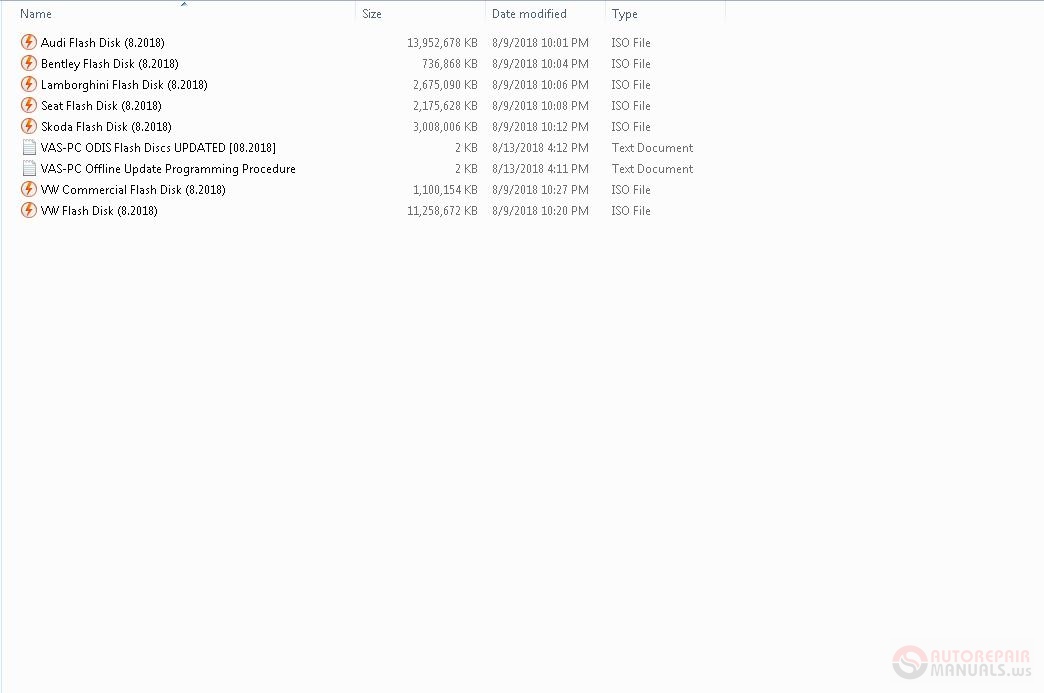
VW Flash Disk (8.2018)
VW Commercial Flash Disk (8.2018)
Audi Flash Disk (8.2018)
Seat Flash Disk (8.2018)
Skoda Flash Disk (8.2018)
Bentley Flash Disk (8.2018)
Lamborghini Flash Disk (8.2018)
VAS-PC/ODIS Flash Discs (UPDATED 10/8/2018)
VAS-PC Offline Update Programming Procedure:
--------------------------------------------
• Insert the Update Programming CD into your PC.
• Minimize or Run your VAS-PC.
• Open "My Computer".
• Open your "E:" Drive. A folder named "datflash" and a file named "label" will be
displayed on the screen.
• Minimize the window.
• Open "My Computer" to open up a new window.
• Open your "C:" drive.
• Open the "SIDIS" folder.
• Open the "Home" folder.
• Copy/Paste the folder named "datflash" to the "Home" folder.
• Close both open windows and maximize the VAS-PC screen.
• Remove programming CD from your PC.
• Activate Vehicle Self Diagnosis from your VAS-PC and select
On Board Diagnostic (OBD).
• Select appropriate address word for module being updated
• At the bottom of the screen, select 019 – Update Programming.
Note the files have to be for the control unit you are going to flash.
The VAS-PC will NOT let you flash a TDi to a Transmission or
a DSG to a 5sp auto. The file needs to be writen for that specific control unit.
Some times there is a compainion file that the VAS-PC reads and make that
dertimination of weither to flash or NOT!
Size: 33,2Gb
Pass: wordwide-autosoftware-epc
High speed link download.
VW Flash Disk (8.2018)
VW Commercial Flash Disk (8.2018)
Audi Flash Disk (8.2018)
Seat Flash Disk (8.2018)
Skoda Flash Disk (8.2018)
Bentley Flash Disk (8.2018)
Lamborghini Flash Disk (8.2018)
VAS-PC/ODIS Flash Discs (UPDATED 10/8/2018)
VAS-PC Offline Update Programming Procedure:
--------------------------------------------
• Insert the Update Programming CD into your PC.
• Minimize or Run your VAS-PC.
• Open "My Computer".
• Open your "E:" Drive. A folder named "datflash" and a file named "label" will be
displayed on the screen.
• Minimize the window.
• Open "My Computer" to open up a new window.
• Open your "C:" drive.
• Open the "SIDIS" folder.
• Open the "Home" folder.
• Copy/Paste the folder named "datflash" to the "Home" folder.
• Close both open windows and maximize the VAS-PC screen.
• Remove programming CD from your PC.
• Activate Vehicle Self Diagnosis from your VAS-PC and select
On Board Diagnostic (OBD).
• Select appropriate address word for module being updated
• At the bottom of the screen, select 019 – Update Programming.
Note the files have to be for the control unit you are going to flash.
The VAS-PC will NOT let you flash a TDi to a Transmission or
a DSG to a 5sp auto. The file needs to be writen for that specific control unit.
Some times there is a compainion file that the VAS-PC reads and make that
dertimination of weither to flash or NOT!
Last edited:
More the random threads same category:
- Multiecuscan 3.6 [04.2017] Full + Instruction
- Actia Multidiag KG 01.2013
- Multiecuscan 3.7 [07.2017] Full Patch + Instruction
- VCDS lite VAG-COM 409 + USB Drive
- Vediamo License KG 05.00.05
- Fiat Multiecuscan 3.5 [2.2017] Full Patch Instruction
- Multiecuscan 3.9 R1+FIX Full + Instruction
- Volvo PTT 2.03.40 With Full
- DVD Software Volvo PROSIS Construction Equipment Manuals and EPC
- Autocom Cars & Heavy Duty R1 2016
- Volvo PTT 2.01 VCADS 3
- NavCoder 2.9.183
- Actia MultiDiag DVD - (01.2013) v27.31
- Delphi Cars DS150E CDP + Cars 2016.0 Full + Instruction
- Vediamo License 04.02.02


